Lovable (Vibe Coding) TutorialBeginner55 min read
Build a YouTube Creator Toolkit with Lovable
Build and publish Creator Forge, a dark local-first YouTube toolkit with a thumbnail studio, title lab, description builder, hashtag generator, hooks, ideas, and browser-saved drafts.
Tutorial ForgeUpdated Aug 23, 2026
1. What you will build
Creator Forge is a single dark, responsive dashboard with a desktop sidebar and a mobile drawer. It bundles six practical tools that turn one video topic into everything you need before uploading. When everything is ready you can export a browser-only YouTube Upload Pack ZIP containing six files: thumbnail.png, title.txt, description.txt, hashtags.txt, hooks-and-ideas.txt, and project-backup.json.
The seven tools
- Title Lab — title variations across twelve proven patterns, with tone and length controls.
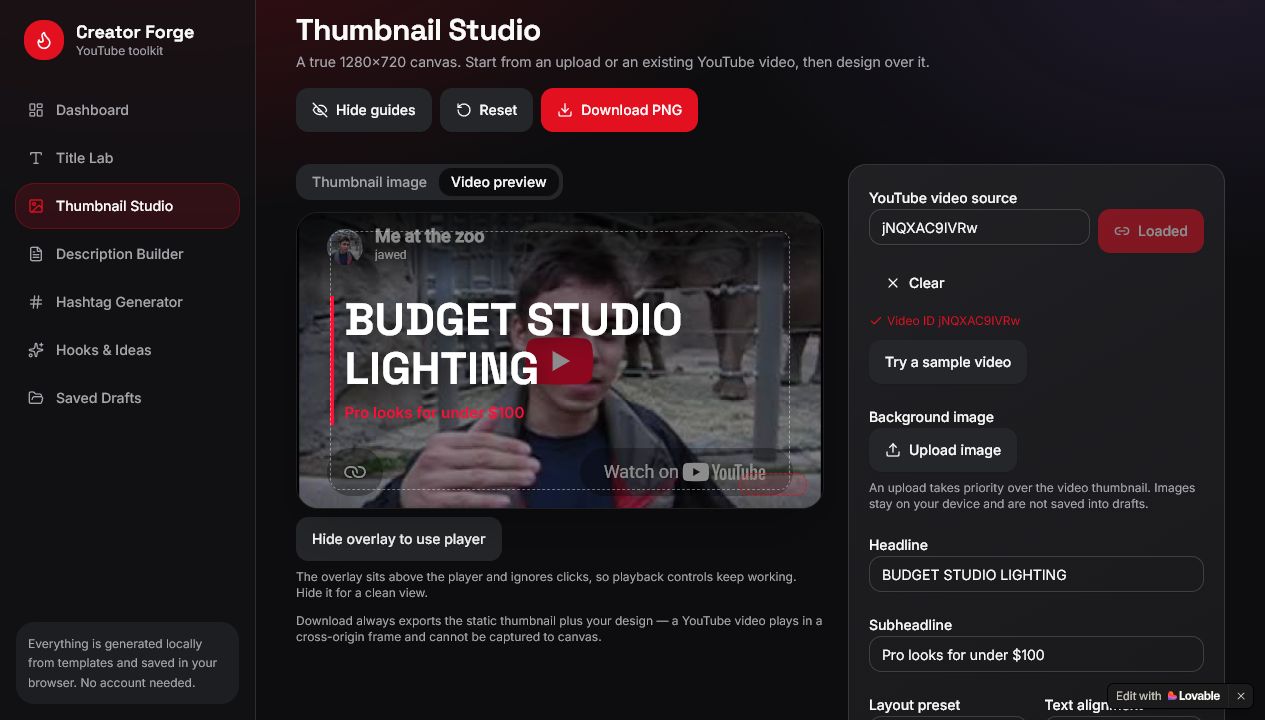
- Thumbnail Studio — a true 1280×720 canvas that starts from a local image upload or from an existing YouTube video. Paste a watch URL, youtu.be link, Shorts link, or bare 11-character ID; it is parsed locally in the browser, loads the public YouTube thumbnail, shows a privacy-enhanced video preview, lets you design a headline overlay on top, and exports a PNG.
- Description Builder — a formatted description with hook, summary, key points, and your links.
- Hashtag Generator — a balanced, de-duplicated mix of broad, niche, and specific tags.
- Hooks & Ideas — opening hooks plus related next-video ideas.
- Saved Drafts — save, reopen, rename, and delete projects in your browser.
- Export YouTube Upload Pack — one ZIP built entirely in your browser with thumbnail.png, title.txt, description.txt, hashtags.txt, hooks-and-ideas.txt, and project-backup.json.
A guided workflow ties it together: Topic → Title → Thumbnail → Description → Hashtags.
2. Open Lovable
- 1.Click the site below with Lovable link to claim your invite credits.
- 2.Sign in or create a free Lovable account.
- 3.Choose New Project so you start from an empty app instead of a template.

3. Paste the build prompt
Copy the prompt below exactly as written and paste it into the Lovable prompt box. It is one complete build request, so you only need to send it once.
Creator Forge build prompt — send once
Create a polished web app called Creator Forge for YouTube content creators. Use a premium dark studio aesthetic with charcoal surfaces, crisp white type, restrained YouTube-red accents, subtle gradients, elegant shadows, and responsive layouts.
Keep this project browser-only and local-first, and keep it credit-conscious. Do not add authentication, user accounts, a database, subscriptions, paid services, external APIs, or AI API keys. All generators must use useful local template logic, and saved data must use browser localStorage. One small client-side library such as JSZip is allowed for building a ZIP file entirely in the browser.
Build a dashboard with a desktop sidebar and mobile drawer. Include:
- Thumbnail Studio: a 1280×720 live canvas-style preview, background image upload, headline and subheadline controls, alignment, font size and weight, text and accent colors, overlay strength, attractive layout presets, safe-area guides, reset, and PNG download.
- Keyless YouTube source: accept a normal YouTube watch URL, youtu.be URL, Shorts URL, or bare 11-character video ID. Parse it locally in the browser. Derive the public YouTube thumbnail, prefer maxresdefault.jpg with a graceful hqdefault.jpg fallback, and show a privacy-enhanced youtube-nocookie.com embed. Do not claim to fetch titles, tags, descriptions, channel information, or analytics without an API.
- In Thumbnail Studio, provide “Thumbnail image” and “Video preview” modes. Render the same headline, subheadline, overlay, alignment, layout, and safe-area guides visually over the public thumbnail and over the embedded video. Keep the player usable. Explain that PNG download uses the static public thumbnail plus the design overlay because a cross-origin iframe cannot be captured to canvas. Keep local image upload as another source.
- Hashtag Generator: inputs for topic, niche, audience, and tone; generate a balanced mix of broad, niche, and specific hashtags; remove duplicates; show count; allow selecting and copying tags.
- Title Lab: generate title variations using how-to, list, curiosity, result, mistake, comparison, beginner, speed, authority, contrarian, question, and transformation patterns; include tone and length controls, copy, shuffle, and favorite actions.
- Description Builder: create a formatted YouTube description from the project topic with an opening hook, summary, key points, customizable links and call-to-action, and copy button.
- Hooks & Ideas: generate opening hooks plus related next-video ideas from the current topic.
- Saved Drafts: save, reopen, rename, and delete project drafts using localStorage. Store the entered YouTube URL or video ID with the draft, but do not store uploaded image files.
- Export YouTube Upload Pack: add an accessible export action on the dashboard, Thumbnail Studio, and Saved Drafts, including per-draft export. Generate one ZIP entirely in the browser with no backend or cloud upload. The ZIP must contain exactly thumbnail.png, title.txt, description.txt, hashtags.txt, hooks-and-ideas.txt, and project-backup.json. The thumbnail must be the current 1280×720 design; title.txt should use a favorite title when available or a sensible generated fallback; description.txt should contain the assembled description; hashtags.txt should use selected tags or the generated set; hooks-and-ideas.txt should have readable section headings; and project-backup.json should be human-readable and include the current project settings without embedding a local image data URL. Sanitize the topic for the ZIP filename and end it with -youtube-upload-pack.zip. Show progress, success, and friendly validation for missing topics, unavailable thumbnails, canvas failures, ZIP failures, and older saved projects. Keep individual PNG download and copy buttons working.
Create a simple guided workflow: Topic → Title → Thumbnail → Description → Hashtags. Add a “Load sample project” action and a discoverable “Start from a YouTube video” entry point. Add a clearly labeled sample video action for testing. Explain in the interface that generation is local template logic, not AI, and that drafts stay only in this browser. Use realistic starter content and helpful validation, loading, fallback, and empty states. Make every button functional; do not leave placeholder sections.
4. Let Lovable build
- 1.Send the prompt and wait for the first build to finish.
- 2.Watch the preview panel appear on the right.
- 3.Open the dashboard and click through the sidebar so you know where each tool lives.
5. Test the workflow
Click Load sample project first. That fills in a realistic topic so every tool has something to work with immediately. A good test topic is “home studio lighting on a budget” with the niche “filmmaking” and the audience “new creators.”
Test each tool
6. Use a YouTube video without an API key
Thumbnail Studio can start from an existing YouTube video instead of an upload. Everything happens in your browser — the link is parsed locally, and no API key or sign-in is involved.
- 1.Open Thumbnail Studio.
- 2.Paste a YouTube watch URL, a youtu.be link, a Shorts link, or a bare 11-character video ID.
- 3.Click Load video, or click Try a sample video.
- 4.Confirm Thumbnail image shows the public YouTube thumbnail.
- 5.Click Video preview and confirm the privacy-enhanced embedded player appears with the design overlay on top.
- 6.Use Hide overlay to use player if you want to watch or scrub the video.
- 7.Change the headline, subheadline, layout, colors, and overlay strength.
- 8.Click Download PNG and confirm the exported file uses the static thumbnail plus your design.
The PNG export always uses the static public thumbnail plus your design overlay. A YouTube player runs inside a cross-origin frame, so it cannot be captured to a canvas.
Functional test checklist
7. Export the YouTube Upload Pack
When a project is finished you can download everything you need for the upload in one archive. The ZIP is built entirely in your browser, so nothing is uploaded anywhere.
- 1.Load the sample project or enter a topic.
- 2.Complete or review the title, description, hashtags, hooks, and thumbnail.
- 3.Click Export Upload Pack on the dashboard, in Thumbnail Studio, or in Saved Drafts.
- 4.Wait for the progress indicator to finish and let the download complete.
- 5.Open the ZIP and confirm it contains exactly these six files: thumbnail.png, title.txt, description.txt, hashtags.txt, hooks-and-ideas.txt, project-backup.json.
- 6.Open the text and JSON files and confirm they match your current project.
- 7.Remember that the ZIP is created locally in your browser and nothing is uploaded to a server.
Export test checklist
8. Optional refinements
Only ask for changes if something is genuinely missing or broken. Keep each request small and focused so it stays cheap.
- 1.“In Thumbnail Studio, add one more centered layout preset with a bolder headline.”
- 2.“In Title Lab, make the copy button show a short confirmation.”
- 3.“On mobile, increase spacing between the sidebar drawer items.”
9. Publish
Click Publish in Lovable and continue through Lovable’s prompts. When publishing finishes, open the live URL and test the workflow again.
10. What to know
There are no accounts and no cloud syncing, so nothing is shared between visitors. Every generator builds its output from local templates and your inputs — not AI — which is exactly why the app is fast, free to run, and cheap to build.
11. Finished
You now have a published dark creator toolkit that turns one topic into a title, thumbnail, description, hashtags, and hooks. Compare yours with the completed version below.
Tags
#lovable#vibe coding#youtube#localstorage#no-backend